
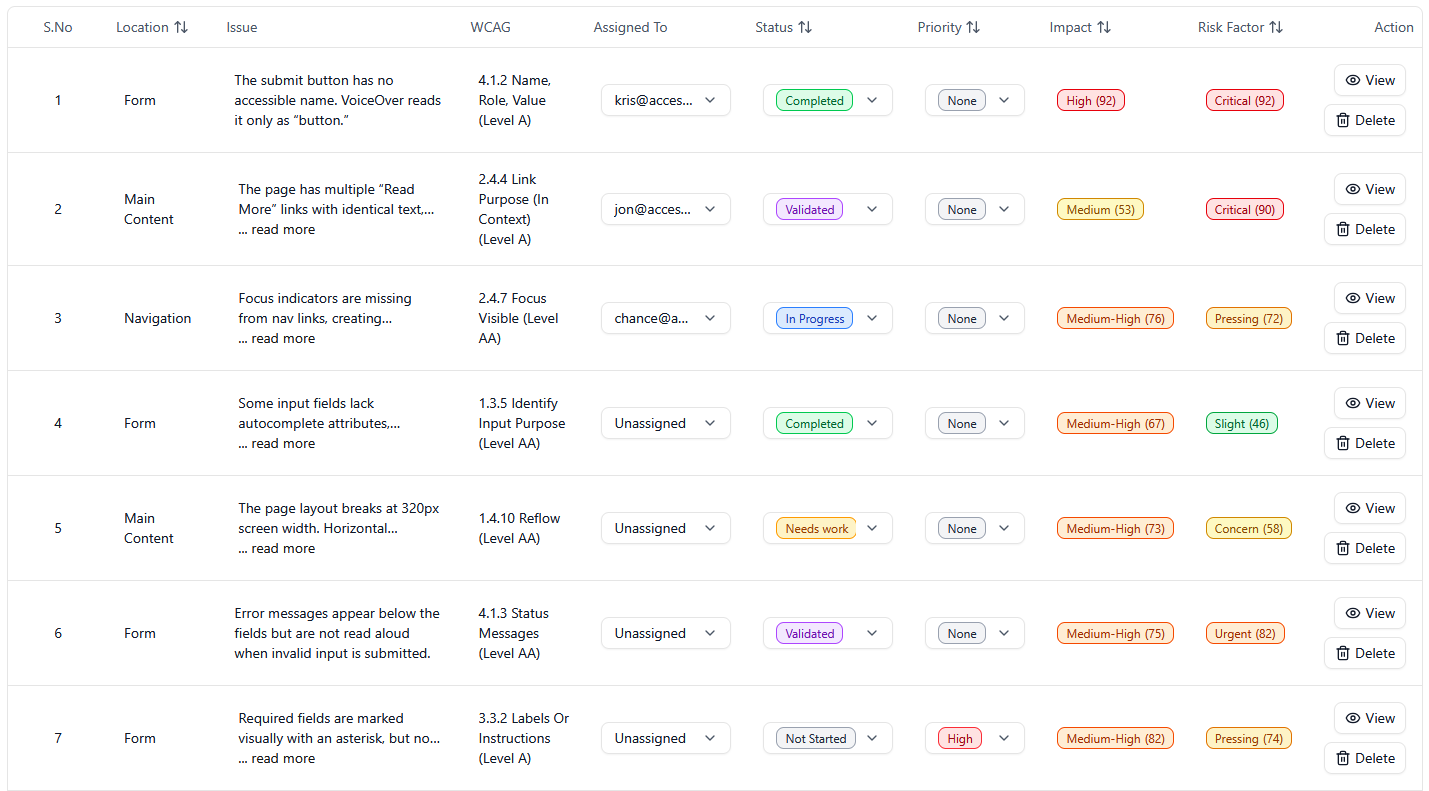
- Accessibility records scattered across emails, PDFs, and spreadsheets are close to useless when you need them.
- We built a repeatable system: one place for audit findings, remediation status, scan results, and dates.
- Good records support legal defense, ACR accuracy, and faster remediation cycles.
We systematized digital accessibility record keeping by putting every audit finding, remediation update, scan result, and testing date into one structured, timestamped log instead of scattering them across inboxes and spreadsheets. That one change turned accessibility work from something we had to reconstruct after the fact into something we could prove on demand.
Here’s why we did it and exactly how you can copy the system.
Why Records Matter More Than People Think
Most organizations treat accessibility documentation as an afterthought. An audit report gets emailed as a PDF, developers fix issues in a ticketing system, someone conducts a scan months later, and none of it connects. Then a demand letter arrives, or a procurement team asks for an ACR, and everyone scrambles.
Good records do three things:
- They demonstrate a genuine, ongoing effort toward WCAG conformance, which matters in legal contexts.
- They make your VPAT work faster and more accurate because the evidence is already organized.
- They prevent re-auditing work that was already evaluated, which saves real money.
What We Actually Log
The system is not complicated. It is disciplined. Every accessibility activity gets a record with a date, a scope, a method, and an outcome. The table below breaks down the core record types.
| Record Type | What It Captures | Why It Matters |
|---|---|---|
| (Manual) audit findings | Issue, WCAG success criterion, location, severity, screenshot | The authoritative baseline for remediation and ACRs |
| Remediation entries | Fix description, who fixed it, date resolved, verification status | Proves issues were addressed, not only identified |
| Scan results | Automated findings, date conducted, pages scanned | Interim monitoring between (manual) audits |
| Policy and training | Accessibility statement versions, staff training dates | Shows organizational commitment over time |
Note the distinction: scans are automated and catch a fraction of issues, while an audit is manual by nature. Scan results supplement the record. They never replace (manual) audit findings.
The Process We Follow
Here is the repeatable cycle, step by step:
- Conduct a (manual) audit and enter every finding as a structured record, not a PDF attachment.
- Assign each finding to an owner with a target date, logged in the same system.
- Mark each fix as resolved only after verification, and record who verified it and when.
- Conduct scans on a schedule, monthly works for most teams, and log the results alongside the audit data.
- Export the full history whenever you need evidence: for an ACR, a legal response, or an internal review.
The verification step is the one teams skip most often. A developer marking their own ticket “done” is not verification. Someone has to confirm the fix actually works with a keyboard and a screen reader, and that confirmation belongs in the record.
What Changed After We Systematized
Two things stood out. First, remediation moved faster because nobody wasted time asking what was already fixed. The record answered that. Second, when clients needed a completed VPAT, the underlying evidence was already assembled, which cut days off the timeline.
Think of the system as a paper trail you build in real time instead of reconstructing under pressure. The reconstruction version is always worse: memories fade, staff leave, and email threads disappear.
If you want to see this in action, Accessibility Tracker was built around exactly this structure: audit findings, remediation status, scan results, and dates in one place. Or start with a spreadsheet and the five steps above. Either way, start logging now, before you need the records.
And if you’d rather not build it alone, an accessibility consultant can set it up for you.
Questions about your compliance path? Contact us.